


Most of us know what a phishing email looks like. It asks you to click a link, log in, or open an attachment so criminals can steal your password. But a new wave of attacks is changing the rules.
Instead of trying to steal your password, attackers are now convincing people to give them access to their Microsoft 365 account using Microsoft's own legitimate sign-in process. Known as device code phishing, these attacks have surged more than 37-fold during 2026, making them one of the fastest-growing phishing techniques being used today.
How does it work?
Imagine you're logging into a website (e.g. Channel 4/ITV) on a smart TV. Rather than typing your password using a remote control, the TV displays a short code which you can use to login to the app/website using your phone or laptop. That's called device code authentication. It's a genuine feature designed to make signing into devices easier, and it's used across multiple sites, including Microsoft.
Cybercriminals have found a way to abuse this process.
Instead of asking you to sign in to your own device, they trick you into entering a code that actually authorises their device. You complete the sign-in on Microsoft's genuine website, so nothing appears suspicious, all URLs are genuine, but you've unknowingly given the attacker access to your account. Because you're using the real Microsoft login page, there is no fake website to spot as phishing, and no password to steal.
Meet the new variations of this attack:
ClickFix and ConsentFix
As if device code phishing wasn't concerning enough, criminals have already developed new ways of persuading people to complete these attacks.
ClickFix: "Your computer has an error" or “Prove you’re human”
ClickFix attacks typically start with a fake error message or CAPTCHA. The website claims there's a problem with your browser or asks you to prove you're human. It then instructs you to press a series of keyboard shortcuts, copy and paste a command, or run something on your computer to "fix" the issue.
Without realising, you're actually running malicious code yourself.
There's no technical hacking involved – the attacker simply tricks you into doing the work for them. ClickFix attacks became one of the fastest-growing attack techniques during 2025 and continue to evolve.
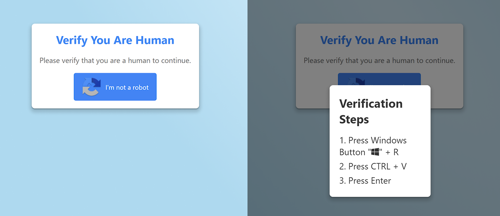
Source: Keep aware blog, 2026
ConsentFix: "Just complete one more step"
ConsentFix takes a different approach. Instead of asking you to run commands, you're guided through what looks like a normal Microsoft sign-in process. You may be asked to drag a link into your browser or approve what appears to be a routine Microsoft prompt. In reality, you're granting the attacker permission to access your Microsoft 365 session.
Because you're interacting with genuine Microsoft pages, traditional advice such as checking the website address becomes much less effective.
Why this matters to financial advisers
Your Microsoft 365 account is often the gateway to your business. If an attacker gains access, they may be able to:
- Read confidential client emails
- Search historic conversations
- Reset passwords for other systems
- Find confidential documents linked to your account
- Impersonate you when communicating with clients
- Gather information to support fraud or business email compromise
The worrying part is that many of these attacks don't rely on malware or stolen passwords. Instead, they rely on persuading someone to complete what appears to be a perfectly legitimate process.
How to protect yourself
As the process is new and uses genuine Microsoft URLs you might not even recognise you’ve been tricked, giving attackers a head start to your data and contacts. Fortunately, a little awareness goes a long way. If you're asked to complete an unusual sign-in process, stop and ask yourself:
- Was I expecting this login request?
- Who asked me to do this?
- Am I being asked to enter a code or approve access for a device I don't recognise?
- Is a website asking me to copy, paste, or run commands to "fix" a problem?
If the answer to any of these questions is yes, pause and verify the request before continuing.
You should also be cautious of anyone contacting you unexpectedly by email, phone, or Microsoft Teams asking you to complete authentication steps. Legitimate organisations should never pressure you into approving sign-ins or following unusual technical instructions.
The key takeaway
Traditional phishing tries to steal your password. Device code phishing tricks you into giving attackers access without stealing it.
Whether it's a fake CAPTCHA (a security check designed to confirm that you’re a real person) asking you to copy and paste commands (ClickFix), a convincing Microsoft sign-in flow (ConsentFix), or a request to enter a device code, the goal is the same: convincing you to authorise the attack yourself.
As these techniques become more common, advisers should remember one simple rule:
If a website or caller asks you to do something you've never done before to "prove you're human", "fix an error", or "complete sign-in", stop, question it, and verify it first. A few moments of caution could prevent your Microsoft 365 account – and your clients' confidential information – from falling into the wrong hands.
Stay informed with Sarah in her latest articles here.
This article is for financial professionals only. Any information contained within is of a general nature and should not be construed as a form of personal recommendation or financial advice. Nor is the information to be considered an offer or solicitation to deal in any financial instrument or to engage in any investment service or activity.
Parmenion accepts no duty of care or liability for loss arising from any person acting, or refraining from acting, as a result of any information contained within this article. All investment carries risk. The value of investments, and the income from them, can go down as well as up and investors may get back less than they put in. Past performance is not a reliable indicator of future returns.

